Easy Labeling Project Page: https://mouseball54.github.io/easy_labeling/
Hello and welcome to the first post on MouseBall54’s Toolbox!
In this post, I’m excited to introduce Easy Labeling, a local-first image annotation tool I developed for computer vision datasets. The current repository supports both Detection for YOLO bounding boxes and Segmentation for brush-based masks.
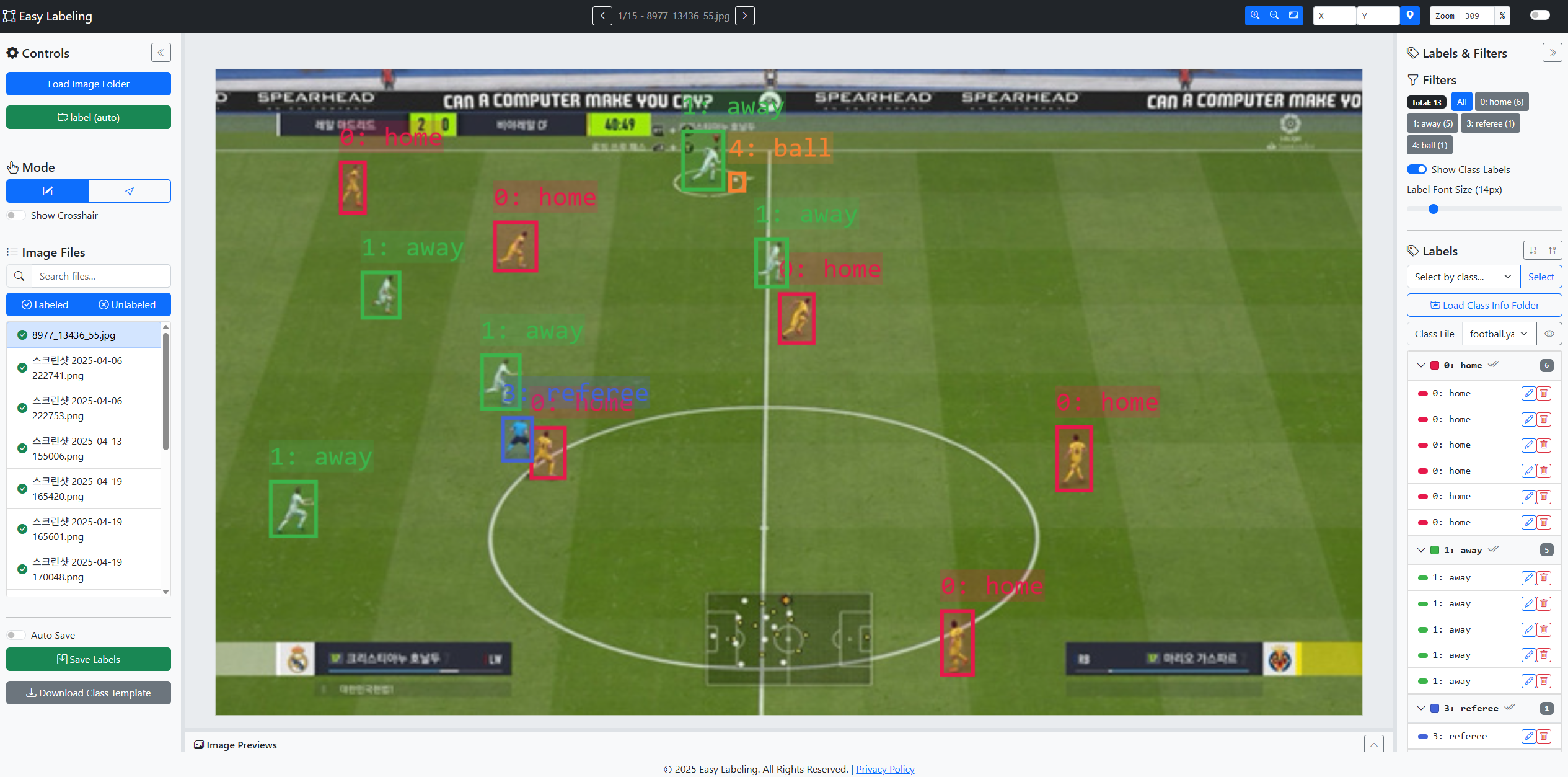
What is Easy Labeling? A Better Way to Build YOLO Datasets
Easy Labeling was created to streamline the often tedious process of building high-quality annotation datasets. Its core philosophy is to be a local-first application. The browser version uses the File System Access API to work directly with local folders, and the repository also documents a Windows Electron build for teams that prefer an installed app.
The current tool has two main workflows. Detection creates YOLO text labels at label/<image>.txt. Segmentation supports brush and eraser mask editing, then saves mask/<image>.png and mask/<image>.seg.json. Class names can be loaded from .yaml files.
Key Features
- Detection Workflow: Creates YOLO bounding-box label files and loads class definitions from
.yamlfiles. - Local File System Integration: Works directly with files on your local machine. No uploads required.
- Detection and Segmentation Tools:
- Draw, edit, move, resize, copy, align, distribute, and delete bounding boxes in Detection.
- Paint and erase masks, adjust brush size, move connected regions, and change region classes in Segmentation.
- Use zoom, pan, crosshair, and preview navigation for detailed work.
- Efficient Workflow and UI:
- Image preview bar, synchronized selection between canvas and label list, and class-based filtering.
- Extensive keyboard shortcuts to accelerate your workflow.
- Advanced Label Management:
- Perform bulk actions, such as changing the class for multiple selected bounding boxes at once.
- Flexible Configuration: Supports various image formats (JPG, PNG, TIFF), an auto-save feature, and a persistent dark mode.
What Matters in a Real Labeling Workflow
The value of Easy Labeling is not only drawing boxes faster. An object detection dataset also needs consistent class order, matching image and label filenames, normalized YOLO coordinates, and a review rule that catches mistakes before training.
For that reason, it is better to start with a small sample folder instead of labeling the entire dataset immediately. Open 20 to 50 representative images in Easy Labeling, draw boxes, save labels, then inspect the generated .txt files. This early pass reveals class ID drift, loose bounding boxes, missing edge-case rules, and filename mismatches while they are still cheap to fix.
Repository-Checked Tool Scope
Current Easy Labeling is not only a YOLO box editor. The repository README documents two workflow tabs: Detection for YOLO bounding boxes and Segmentation for brush-based masks. Detection saves label/<image>.txt in YOLO format. Segmentation saves mask/<image>.png and mask/<image>.seg.json.
Use Desktop Chrome or Edge for the browser version because local folder read/write depends on the File System Access API. The repository also documents an Electron Windows build for teams that prefer an installed local app. Detection list actions such as multi-edit, alignment, distribution, copy, and paste should be treated as Detection-focused features, while Segmentation editing is brush, eraser, connected-region selection, drag, and class-change work.
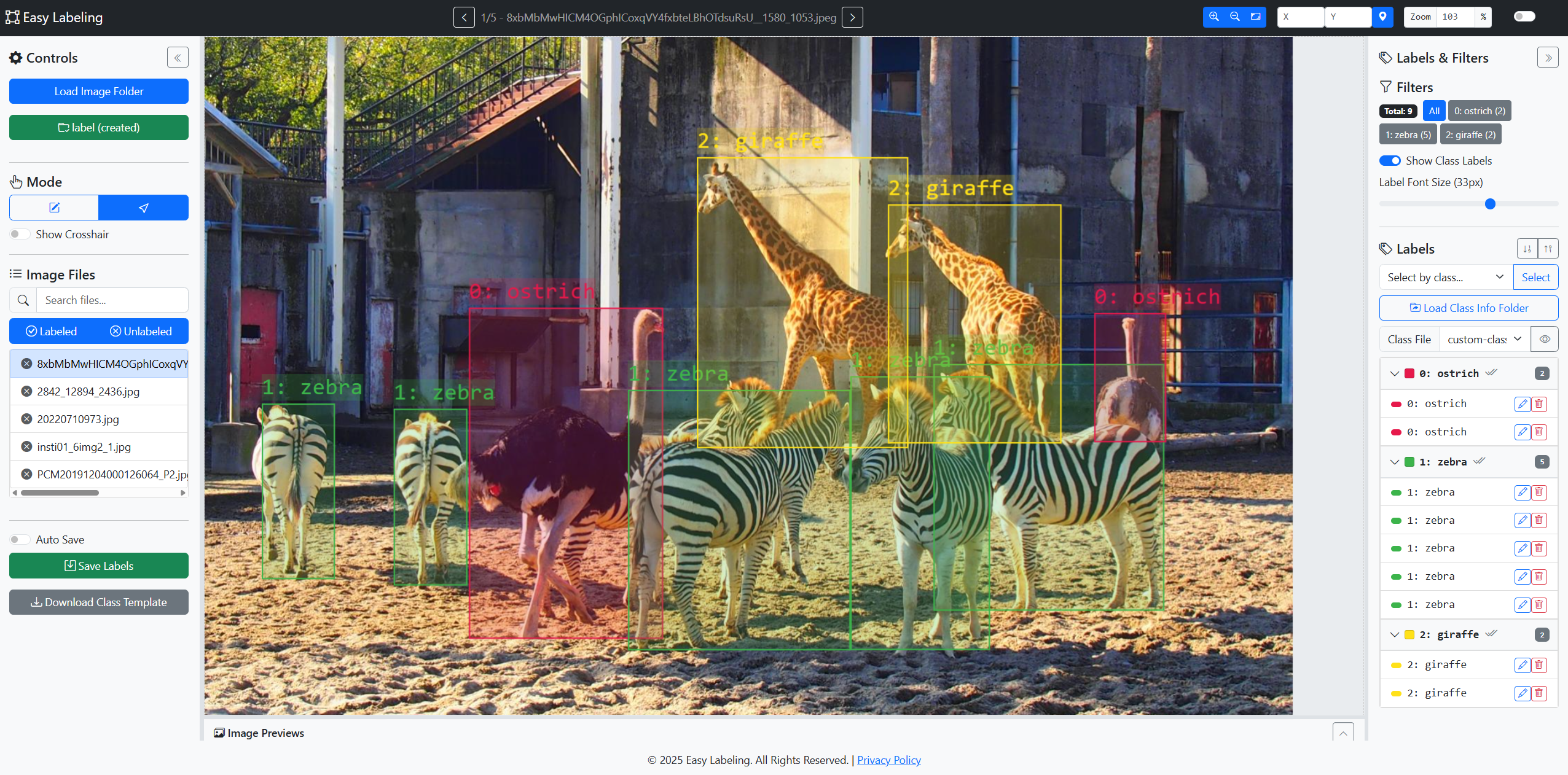
Production labeling also needs an instruction document. Class names such as “person,” “vehicle,” or “sign” can still become ambiguous when objects are occluded, truncated, reflected, very small, or partially outside the image. Keeping those edge cases as visual examples helps new labelers make the same decisions as reviewers.
Before handing the dataset to training, check the images/train, images/val, labels/train, and labels/val structure, then verify the data.yaml class order. Many problems that look like model failures actually begin with missing label files, filename mismatches, or class order changes.
Professional Depth Check
For Introducing Easy Labeling: Local Detection and Segmentation Annotation Tool, the practical standard is not whether the reader can repeat one instruction once. Treat the topic as a computer-vision dataset quality workflow: verify class dictionary, annotation consistency, train/validation/test split, and export format before drawing a conclusion. The result should be written as a small decision record, because future readers need to know which fact was observed, which assumption was used, and which condition would change the answer.
Evidence That Makes the Guidance Reliable
Source Notes
- Easy Labeling GitHub Repository: current tool scope, Detection/Segmentation workflows, save formats, browser requirements, and Electron build notes.
- MDN File System Access API: browser-side folder access and local file handling background.
- Ultralytics Object Detection Dataset Docs: YOLO dataset folder and label-format reference.
- CVAT YOLO Format: cross-tool notes for YOLO annotation exports.
Current Repository Status
The GitHub repository now documents Easy Labeling as a two-workflow local annotation tool: Detection for YOLO boxes and Segmentation for brush-based masks. Use Desktop Chrome or Edge for the browser version because local folder read/write depends on browser support, or inspect the Electron commands if a Windows app build fits your workflow.
If you’re interested in the project, check the GitHub repository and compare the README with your dataset requirements before starting a large labeling batch.
Related Reading
Continue with these related posts from the same topic area.


Leave a comment