Quick Answer
GH006: Protected branch update failed means GitHub rejected your push because the target branch is protected.
The usual fix is not to force the push.
Create a new branch, open a pull request, pass required checks, get required reviews, and merge through the allowed path.
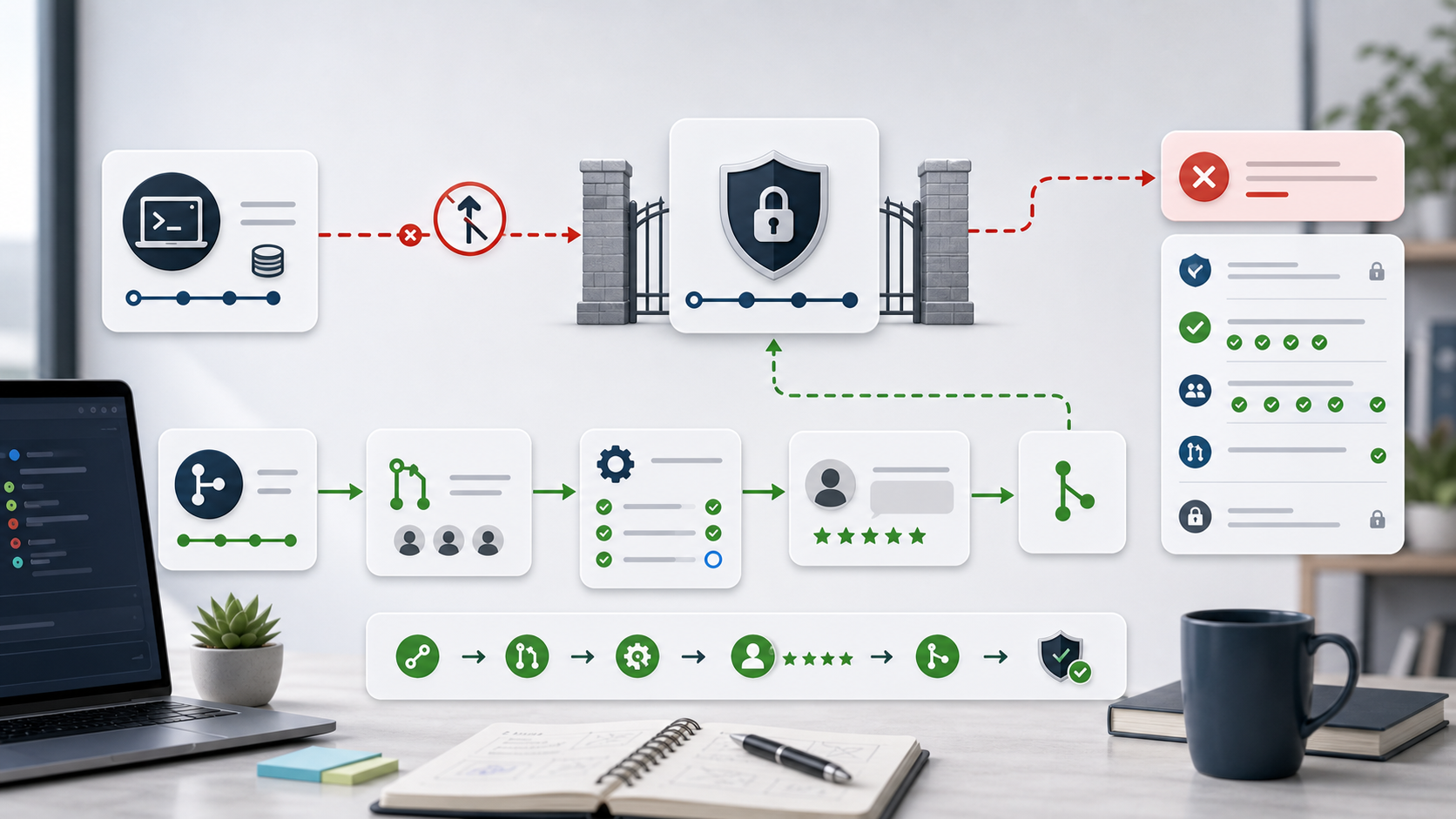
The image shows the core idea. A direct push is blocked at the protected branch gate. The pull request path can pass through checks, reviews, and policy gates.
Typical Error
You may see:
remote: error: GH006: Protected branch update failed for refs/heads/main.
remote: error: Required status check "build" is expected.
remote: error: At least 1 approving review is required.
The exact detail depends on the branch rule. GitHub can block a push because required checks are missing, required reviews are missing, force pushes are disabled, signed commits are required, or direct pushes are not allowed.
1. Confirm Which Branch Is Protected
Check the branch you are pushing:
git branch --show-current
git status
git remote -v
Then check the push target:
git push origin HEAD
If HEAD is main, master, production, or another protected branch, the rejection is expected.
Protected branches are designed to stop direct updates.
2. Push to a Feature Branch
Create a branch and push it:
git switch -c fix/my-change
git push -u origin fix/my-change
Then open a pull request from fix/my-change into the protected branch.
This gives GitHub a place to run checks and collect reviews.
If the branch already exists:
git switch fix/my-change
git push
Do not use --force against a protected branch unless the repository rules explicitly allow it and you understand the impact.
3. Wait for Required Checks
Branch protection often requires CI status checks. Open the pull request and check whether GitHub Actions or another CI system is running.
If checks are stuck:
- Confirm the workflow exists on the target branch.
- Check whether the workflow is skipped by path filters.
- Check secrets or permissions used by the workflow.
- Re-run the failed job after fixing the cause.
If checks fail, fix the build on the feature branch and push again. The protected branch should not be updated until checks pass.
4. Get Required Review Approval
Some protected branches require one or more approving reviews. In that case, the push is blocked until the pull request has enough approvals.
Common review-related blockers:
- No approval yet
- Requested changes are unresolved
- Approval was dismissed by a new commit
- Code owner review is required
- The author cannot approve their own pull request
Check the pull request review box. If code owners are required, ask the listed owner to review.
5. Check Admin and Bypass Rules
Repository admins may or may not be allowed to bypass branch protection. Organizations can also enforce rulesets that apply across repositories.
If you own the repository and want to change the behavior, review:
- Required pull request reviews
- Required status checks
- Require branches to be up to date
- Restrict who can push
- Require signed commits
- Allow force pushes
- Allow deletions
Change rules only when the team process should actually change. Do not weaken protection just to avoid fixing a failed check.
6. If You Need to Update a Protected Branch Now
Use the least risky path:
git switch -c hotfix/short-description
git push -u origin hotfix/short-description
Open a pull request. Run the required checks. Ask for the required review. Merge through the repository’s allowed merge button.
If production is broken and your organization has an emergency bypass process, follow that documented process. Record why the bypass was needed.
Common Mistakes
The first mistake is treating GH006 as an authentication problem. Your login may be correct. GitHub is rejecting the update because branch rules say the push is not allowed.
The second mistake is using git push --force.
Protected branches usually reject it, and force pushing can rewrite shared history if allowed.
The third mistake is trying to push directly after fixing tests locally. Required checks must pass on GitHub or the configured CI provider, not only on your machine.
The fourth mistake is changing branch protection rules instead of fixing the reason for failure. Protection rules exist to keep the main branch stable.
Professional Depth Check
For Fix GH006 Protected Branch Hook Declined: Why GitHub Blocks Your Push, the practical standard is not whether the reader can repeat one instruction once. Treat the topic as a reproducible debugging procedure: verify repository root, branch and remote state, index and working tree, and credential or network boundary before drawing a conclusion. The result should be written as a small decision record, because future readers need to know which fact was observed, which assumption was used, and which condition would change the answer.
Related Reading
- How to Fix Git fatal Authentication failed
- GitHub Actions Build Failed
- GitHub: About protected branches
- GitHub: Managing a branch protection rule
Final Checklist
[ ] You are not pushing directly to a protected branch.
[ ] Your work is on a feature or hotfix branch.
[ ] The pull request targets the correct base branch.
[ ] Required CI checks passed.
[ ] Required reviews or code owner approvals are complete.
[ ] Branch protection rules were not weakened unnecessarily.
GH006 is usually a process error, not a Git syntax error. Use the pull request path and satisfy the branch rule that GitHub reports.
FAQ
When should I use this guide?
Use it when you can reproduce the error and need a practical order for checking commands, versions, paths, permissions, and logs.
What should beginners verify first?
Start with the exact error message, the command you ran, the operating system, and the tool version. These details usually narrow the cause faster than changing many settings at once.
Which keywords should I search next?
Search for “Fix GH006 Protected Branch Hook Declined: Why GitHub Blocks Your Push” together with the exact error text, version, operating system, and tool name used in your environment.


Leave a comment